Real platforms • Real screens • Clear differences

Digital Options Brokers & Trading Platforms

Compare real trading interfaces, product mechanics, expiry controls, payout displays, demo access, payments and verification before choosing a platform.

Unofficial IQ Option website. DigitalOptions.co is independently operated and is not operated by IQ Option.

AV By Alex Vega •Updated October 2026
◆Product-first comparisonMechanics, account flows & platform evidence
▥Dated evidencePlatform checks are time-stamped
●Mechanics matterLabels and order tickets are compared
Platform shortlist

Compare Digital Options & Fixed-Time Trading Platforms

Five platforms can look similar in a broker list and still behave very differently once you open the trading terminal.

View full comparison →
Q

Quotex

Digital Options
Direct Up / Down

A compact Up/Down workflow built around the current price, trade amount, expiry and the return shown for the selected asset.

  • Simple reference-price workflow
  • Demo terminal tested
  • Expiry and payout controls checked
Open Quotex Platform details →
IQ

IQ Option

Digital Options
Selectable Strikes

A different Digital Options model with multiple strike levels, changing displayed profitability and an early Sell control.

  • Multiple strike levels observed
  • 1 / 5 / 15 min expiry choices
  • Early Sell verified in current UI
Open IQ Option Risk warning: your capital might be at risk Platform details →
B

BinoDex

Digital Options
Up / Down + OTC

Dedicated Digital Options trading with OTC assets, visible payout data and a broad set of expiry controls in the tested account.

  • Dedicated Digital Options area
  • OTC demo trade completed
  • Trade history checked
Open BinoDex Platform details →
B

Binolla

Fixed Time in terminal
Higher / Lower

The live terminal calls the product Fixed Time, while Binolla educational material uses Digital Options terminology for the same family.

  • Higher / Lower market trades
  • OTC assets observed
  • Verification flow inspected
Open Binolla Platform details →
PO

Pocket Option

Fixed-time related product
Quick Trading

Pocket Option currently labels the product Quick Trading, with BUY/SELL direction controls, short durations and a built-in Signals feed.

  • Current UI: Quick Trading
  • 3-second trade captured
  • Signals + Copy signal visible
Open Pocket Option Platform details →

Sponsored platform links are marked with rel="sponsored". Product names and mechanics above are based on the current interfaces and evidence described on this page.

Side-by-side

Digital Options Broker Comparison

Compare the product model first. A high payout shown in one session does not make two platforms equivalent.

All PlatformsProductDemoOTCEvidence
PlatformProduct labelCore mechanicDemoOTCDistinctive controlLast checked
QuotexDigital OptionsUp / DownObservedObservedReference-price + expiryOct 2026Details →
IQ OptionDigitalSelectable strikesObservedObservedMultiple strikes + early SellOct 2026Details →
BinoDexDigital OptionsUp / DownObservedObservedDedicated product areaSep 2026Details →
BinollaFixed TimeHigher / LowerObservedObservedMarket + Pending modesOct 2026Details →
Pocket OptionQuick TradingBUY / SELLObservedObservedSignals / Copy signalOct 2026Details →

Observed means the feature was visible in our first-hand platform evidence. Quotex OTC instruments were visible in the September 2026 test, and IQ Option Digital trading was captured on a CARDANO (OTC) position in October 2026.

Platform by platform

What Changes From One Trading Platform to Another?

The broad category is only the starting point. The actual ticket, expiry selector, payout display and account flow can change substantially from broker to broker.

QuotexDigital Options · Up / Down

Quotex is the most direct workflow in this group. During our September 2026 platform test, the amount, expiry, payout and Up/Down controls were visible beside the chart, so the full decision could be made without moving through multiple screens. The asset selector also displayed different return percentages across instruments in the same session.

That matters because a headline payout should not be treated as the rate for every asset. One EUR/USD capture showed a 91% displayed return during our test, while other instruments showed different values. We also checked the expiry controls, indicators and completed demo-order history.

What stands out: a compact reference-price workflow that is easy to understand before comparing deeper account details.

Explore Quotex details →
IQ OptionDigital · Selectable strikes

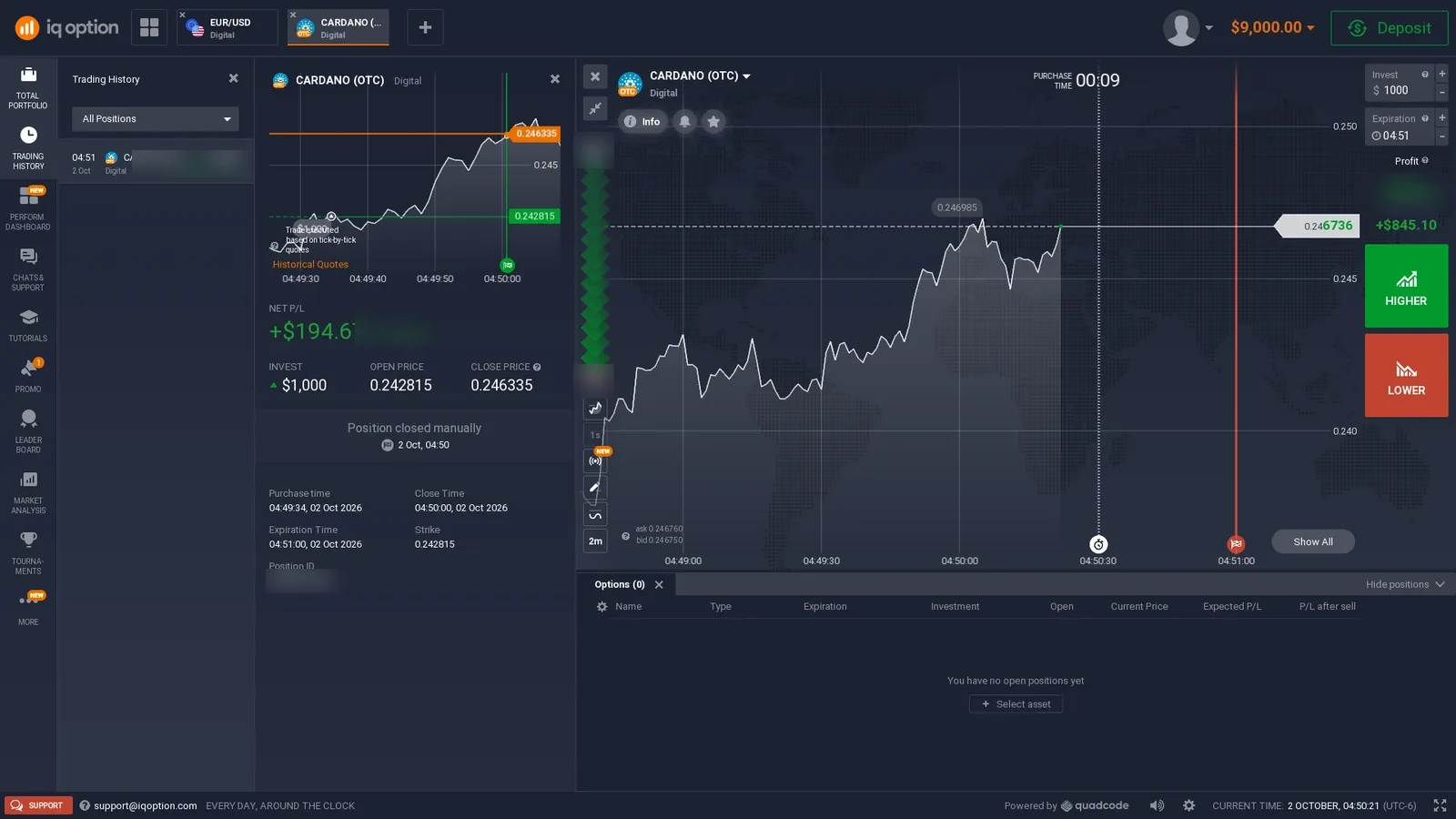
IQ Option is the strongest counterexample to the idea that all Digital Options are simply one-price Up/Down trades. The current platform separates Digital from Binary and Blitz, and the Digital ticket we checked exposed several selectable strike levels at the same time.

The tested interface also showed 1-, 5- and 15-minute expiration choices, a visible expected-profit figure and an early Sell control. In our completed-history evidence, one Digital position was manually closed before its scheduled expiry. That makes the trade-management model materially different from a contract that can only be held until settlement.

What stands out: strike selection and early closing add decisions that do not exist in every fixed-time product.

Explore IQ Option details →
BinoDexDigital Options · OTC

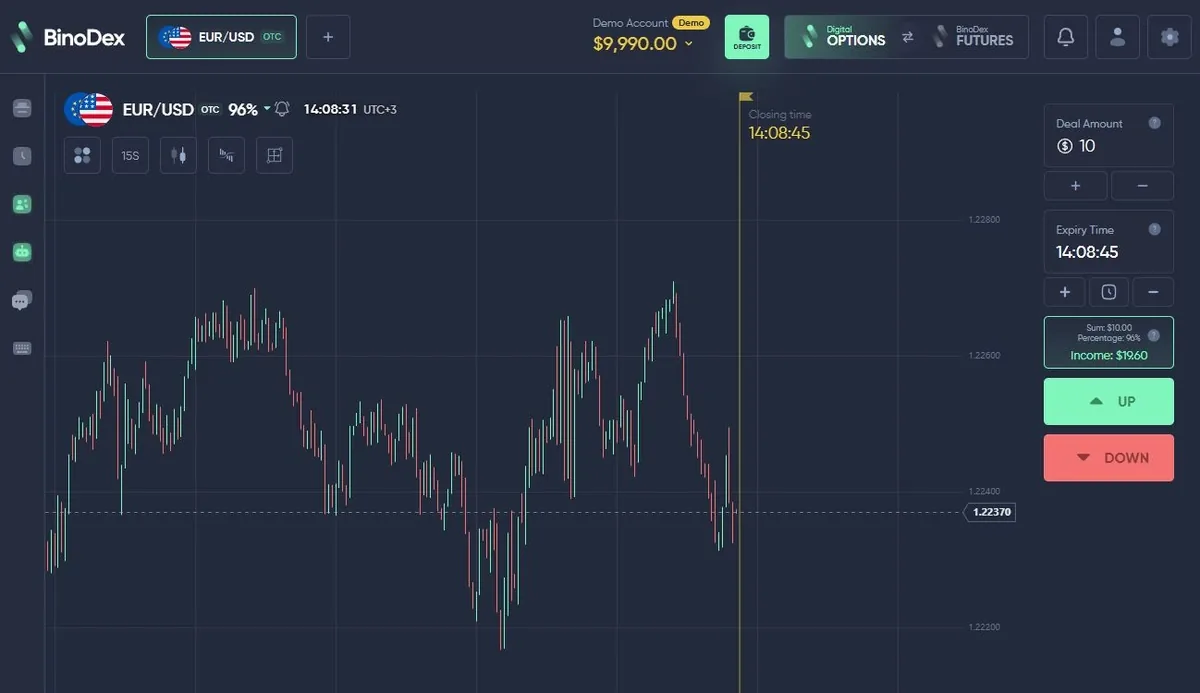
BinoDex gives us a second direct Digital Options implementation, but the surrounding platform is different from Quotex. In a logged-in account we inspected the Digital Options terminal, asset browser, payout display, chart settings, indicators, drawing tools, expiry selector and amount control.

We then placed a $10 EUR/USD OTC demo trade and allowed it to expire before checking the completed result in history. That end-to-end workflow is useful evidence because it confirms more than the pre-trade screen. OTC instruments were also part of the tested product experience.

What stands out: a conventional Up/Down Digital Options ticket combined with OTC availability and a broader platform environment.

Explore BinoDex details →
BinollaFixed Time · Higher / Lower

Binolla is important because the live terminal and the educational terminology do not use exactly the same label. Inside the current platform the product is called Fixed Time. Binolla’s own educational material, however, describes the same product family with Digital Options terminology.

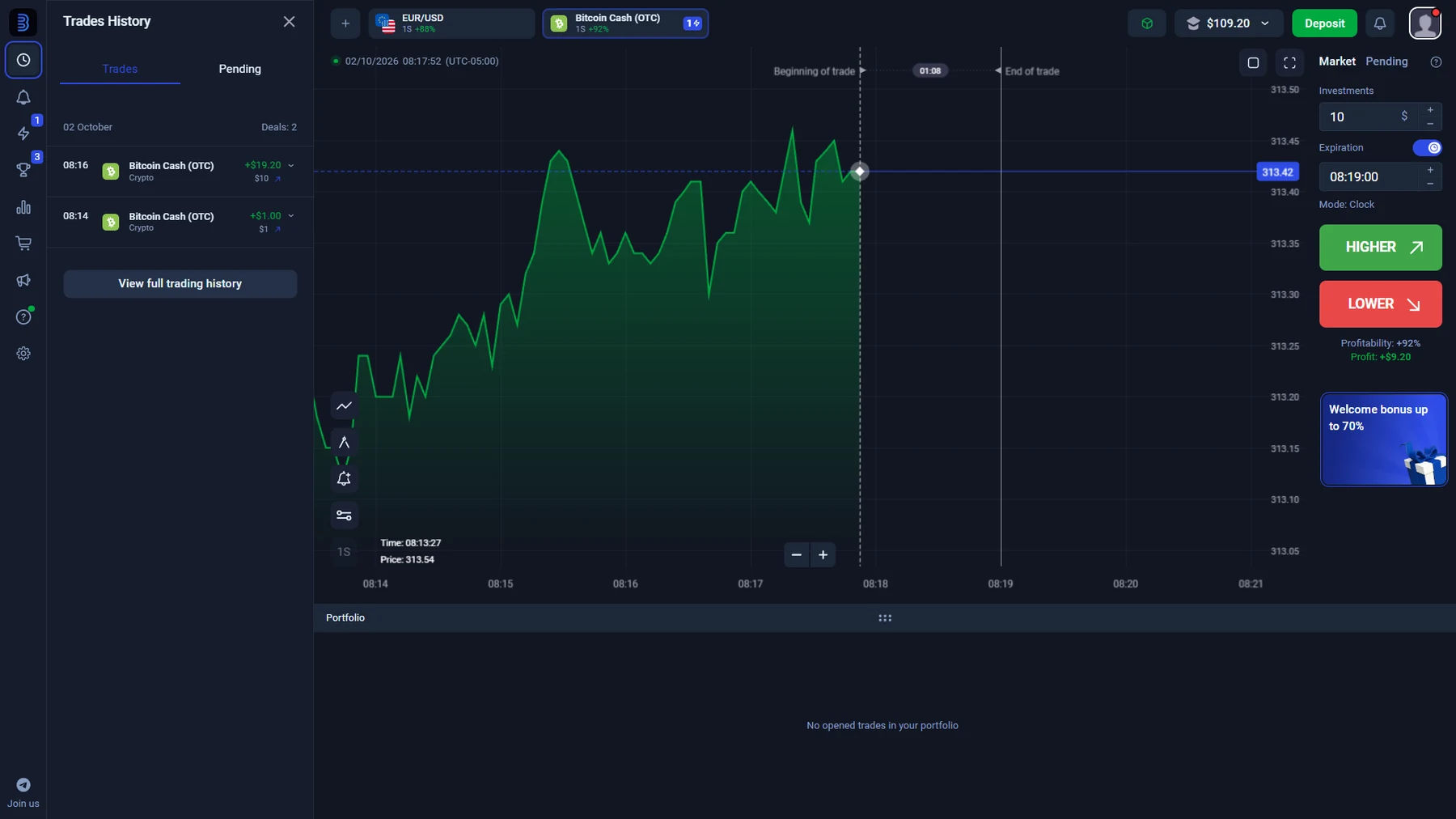
Our current account check captured Higher/Lower controls, Bitcoin Cash OTC, a $10 market trade with a one-minute expiration and 92% displayed profitability in that session. We also observed a separate pending-order mode using By price and By time, then checked completed trade history, cashier methods, withdrawals and the identity-verification step.

What stands out: the live product behaves like the fixed-time Higher/Lower family, but the terminology must be reported accurately.

Explore Binolla details →
Pocket OptionQuick Trading · BUY / SELL

Pocket Option currently uses the name Quick Trading in the account selector rather than Digital Trading. The same account menu also separated Shares Trading and Forex MT4/MT5, which makes the current product structure clear from inside the platform itself.

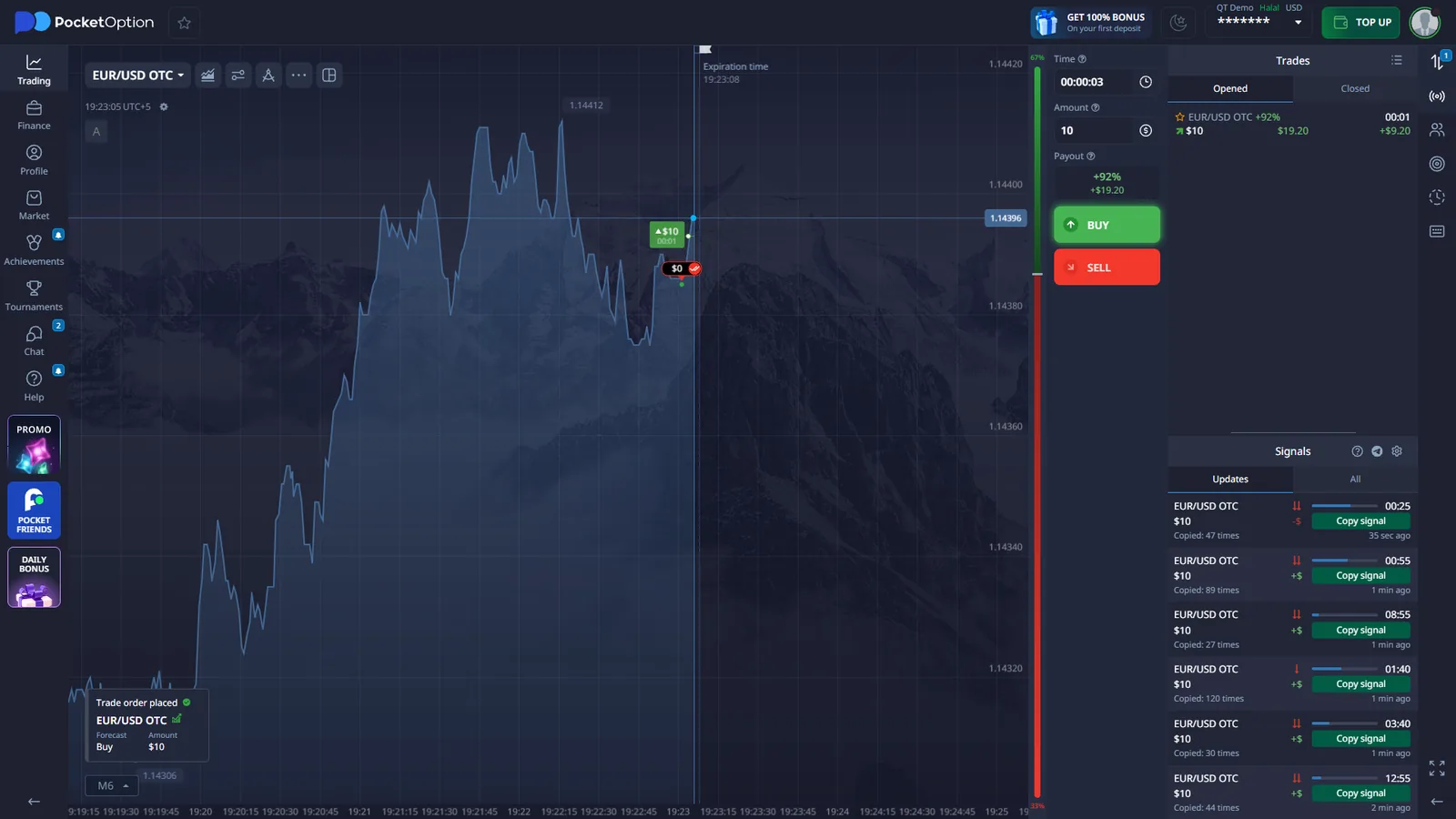
Our fresh QT Demo capture showed EUR/USD OTC, a $10 amount, a three-second trade time, BUY/SELL controls, a 92% displayed payout in that specific session and an opened demo trade. The same interface included a Signals feed with Copy signal controls.

What stands out: very short fixed-time trading and built-in signals under Pocket Option’s current Quick Trading label.

Explore Pocket Option details →
Decision framework

How to Choose a Digital Options Trading Platform

Start with the product, account flow and current availability that match what you actually want to use.

1

Start with the product mechanic

If you want the simplest directional ticket, a direct Up/Down model may be easier to learn. If you specifically want selectable strike levels, a platform such as IQ Option is a different category of experience. Quick Trading and Fixed Time should also be understood by their current platform labels rather than treated as identical products.

2

Use demo before comparing bonuses

A practice account lets you test the chart, asset selector, expiry controls, amount field and history without relying on promotional copy. One completed demo trade often tells you more about the workflow than a long feature list.

3

Read the live payout, not an old headline

Displayed returns can move by asset, session, strike and product. A percentage captured today is evidence of what the ticket displayed at that moment, not a permanent rate for every user or instrument.

4

Inspect the cashier for your account

Payment methods and minimums can be region-specific. Look at the methods actually exposed after login, the minimum shown for the route you intend to use and the withdrawal options available to the same account.

5

Check verification before you need it

Identity checks are easier to understand before a financial action is urgent. We inspect the verification flow so readers can see whether the account asks for personal details, identity documents or additional security steps.

6

Confirm availability where you live

A platform can be visible online while a product, payment route or account type is unavailable in a particular location. Current provider restrictions and local rules should be checked before funding.

The key difference

Not All Digital Options Work the Same Way

The label can hide material differences in strike selection, expiry, payout logic and even the product name shown in the terminal.

01

Up / Down and Reference-Price Contracts

Quotex and BinoDex are closer to the direct model: choose an asset, amount, expiry and direction, then compare the final price with the relevant reference level. The platform shows the potential return before entry, but the displayed percentage can change by asset and session.

02

Selectable Strikes and Variable Payouts

IQ Option is materially different. The Digital interface we checked exposed several selectable strike levels at once, and the displayed profitability changed around those levels. We also observed an early Sell control and verified a Digital position that was manually closed before its scheduled expiry.

03

OTC and Short-Expiry Variants

OTC instruments appeared across several tested platforms, but implementation is not identical. BinoDex, Binolla and Pocket Option all exposed OTC assets, while Pocket Option’s current Quick Trading interface also allowed very short durations — including the three-second EUR/USD OTC example captured in QT Demo.

04

Fixed Time vs Digital Options Naming

Binolla shows why terminology matters. The live trading terminal calls the product Fixed Time, while Binolla educational material uses Digital Options terminology. We report the live interface label alongside the terminology used in Binolla’s own educational material.

05

Quick Trading Is a Different Product Label

Pocket Option currently presents Quick Trading Real and Quick Trading Demo in the account selector, so we use the product name shown in the live interface.

First-hand evidence

What We Actually Saw on the Platforms

Each screenshot supports a specific factual claim on this page.

ⓘ Account IDs, personal details and security data are excluded or redacted where necessary.
IQ Option Digital Options interface with an open position and trading controls
IQ Option — Digital tradeCurrent Digital interface with an open position and product controls.
BinoDex logged-in Digital Options trading terminal
BinoDex — Digital OptionsLogged-in Digital Options terminal used in our platform test.
Binolla Fixed Time completed trades history
Binolla — completed tradesTrade history captured after Fixed Time market trades.
Pocket Option Quick Trading Demo with EUR USD OTC BUY SELL controls and Signals
Pocket Option — Quick TradingFresh QT Demo screen with EUR/USD OTC, BUY/SELL and Signals.
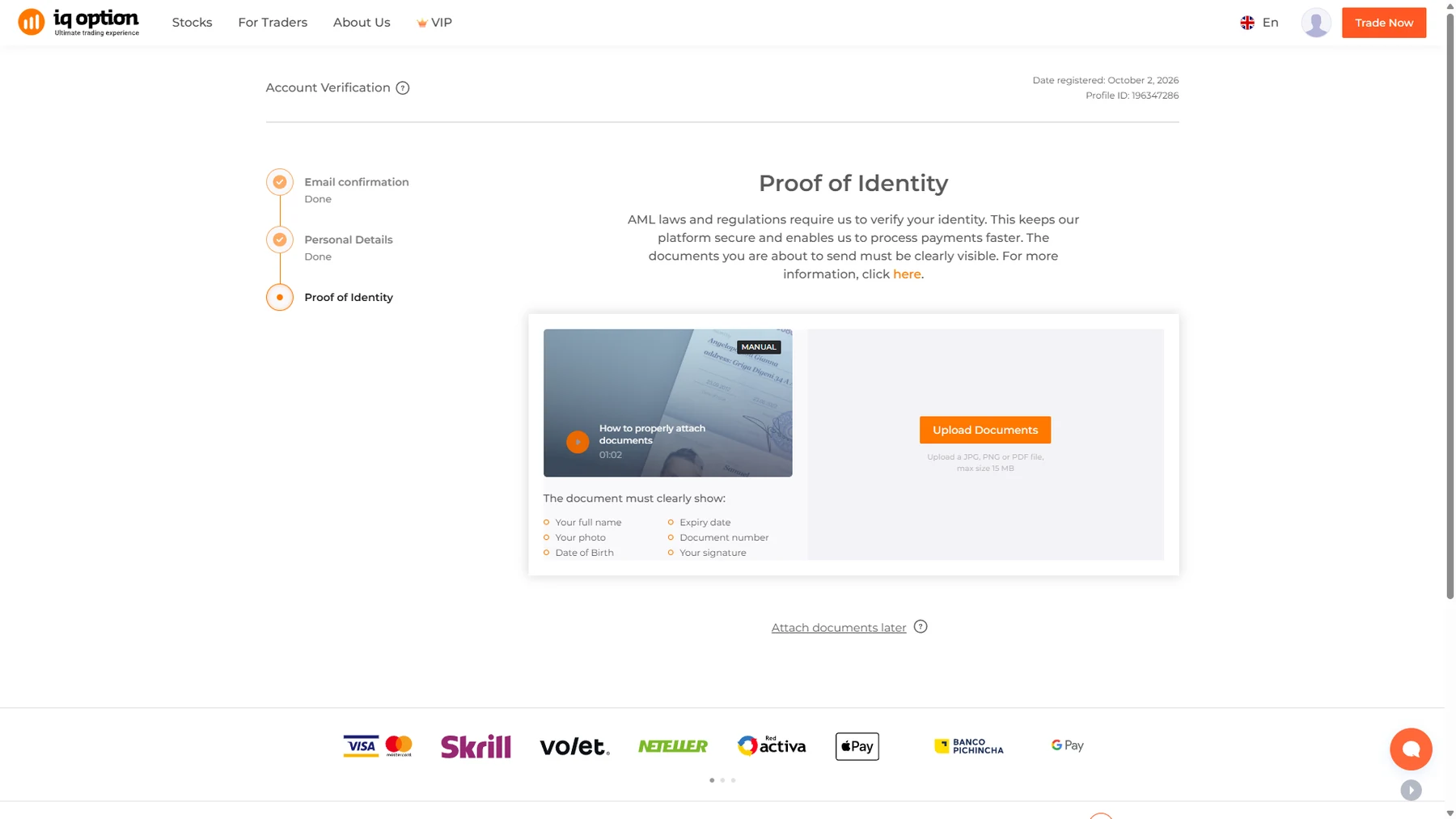
IQ Option proof of identity verification step
IQ Option — verificationProof-of-identity step from the account verification flow.
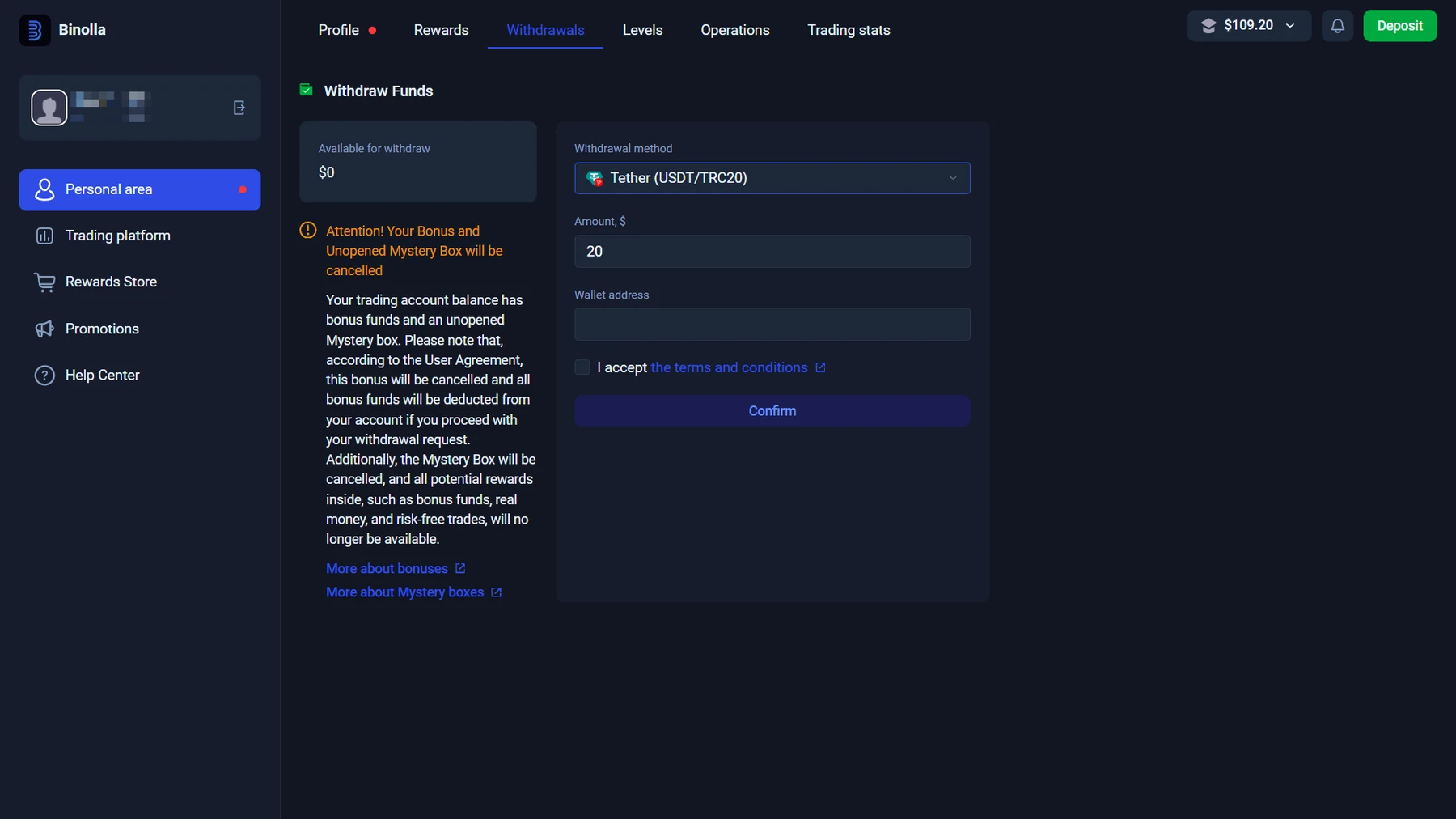
Binolla withdrawal panel with method controls
Binolla — withdrawalWithdrawal panel and method controls in the checked account.
Core concept

What Are Digital Options?

Digital Options are short-duration trading contracts whose result depends on whether a defined price condition is met. The exact contract can differ by platform.

On a simple Up/Down interface, the trader chooses an asset, trade amount, expiry and direction. Other platforms add selectable strike prices, different payout levels or an early-close feature. This is why two brokers can both discuss digital or fixed-time trading while presenting a materially different order ticket.

The most useful questions are not simply “Does this broker offer Digital Options?” but: What does the platform call the product? How is the strike or reference price chosen? What expiry choices are available? How is the potential return shown before entry?

Those are the differences we compare throughout DigitalOptions.co.

Trade workflow

How Digital Options Trading Works

The basic sequence is simple, but the controls inside each step can differ substantially by platform.

1

Choose an Asset

Depending on the platform and account, the asset browser can contain currencies, crypto, stocks, commodities, indices and OTC instruments. The selected asset can change the displayed payout, trading schedule and expiry choices.

2

Set the Amount and Expiry

Choose the amount placed on the contract and when it should end. Expiry systems are not standardized: IQ Option showed 1-, 5- and 15-minute Digital choices in our current account, while BinoDex exposed a broader set of short and longer times.

3

Choose Higher / Lower or a Strike

Direct Up/Down products compare the final price with a reference level. Strike-based Digital Options add another decision. IQ Option, for example, exposed several selectable price levels rather than limiting the ticket to one entry reference.

4

See the Result at Expiry

If the contract condition is met, settlement follows the return displayed for that contract. Some products add extra controls: during our IQ Option test an open Digital position could be sold before its scheduled expiry.

Practice first

Digital Options Demo Accounts

A demo account is one of the fastest ways to understand whether a trading platform suits you before funding it. Instead of judging a broker from marketing screenshots, you can inspect the actual chart, asset selector, trade ticket, payout display, expiry controls and history.

We have used demo or practice trading while checking the relevant interfaces on Quotex, IQ Option, BinoDex, Binolla and Pocket Option. On Quotex, our platform test covered the terminal, asset selector, session payout values, expiry controls, indicators and a completed demo-order workflow.

A demo is especially useful for comparing workflow: simple Up/Down, selectable strikes, very short durations or extra tools such as signals.

Compare Demo Accounts
Demo checklist
  • Open the asset browser
  • Check the live payout display
  • Open the expiry selector
  • Place one practice trade
  • Verify the result in history
Trading conditions

Payouts, Expiry Times and Minimum Trade Size

Live trading conditions should be read as live conditions — not permanent broker specifications.

Payouts change

The percentage shown by a platform can change with the asset, session, product type or strike. During our Quotex test, different instruments displayed different return percentages and one EUR/USD screen showed 91%. In current IQ Option, Binolla and Pocket Option sessions we also observed session-specific figures rather than one universal rate.

Expiry changes the product

A three-second Quick Trading contract is not equivalent to a 15-minute Digital Option even if both involve predicting price direction. Available times must be checked in the actual ticket for the selected asset and product.

Trade size is not deposit size

Minimum trade size and minimum deposit are separate limits. A broker can allow a small position while requiring a larger funding amount. We keep those figures separate rather than blending them into one headline minimum.

Beyond the chart

Deposits, Withdrawals and Identity Verification

A trading platform is more than its chart. Before choosing one, it also makes sense to inspect how the cashier, withdrawal panel and account verification process actually work.

Payment methods are account- and region-specific, so we report the methods displayed in the checked account.

In the IQ Option account we checked, the deposit screen displayed Visa/Mastercard, Skrill, Neteller, several cryptocurrencies and local payment methods. A card deposit screen showed a $10 minimum in that account, while the verification flow included personal-details and proof-of-identity steps.

Binolla showed a varied cashier as well. Our checked account displayed USDT, BNB, BTC, ETH, LTC, TRX, Volet.com and local bank-transfer options among the available routes. Different methods showed different minimums in the current session.

Listed withdrawal methods and processing estimates are reported as account-specific interface data.


Terminology

Digital Options vs Binary Options

Digital Options and Binary Options overlap, but the terms are not always used for exactly the same product. A classic binary-style contract usually centers on a simple condition: will the asset finish above or below a defined strike or reference price at expiry?

Some Digital Options implementations add more flexibility. IQ Option is the clearest example from our current testing: its Digital interface displayed multiple selectable strike levels, different displayed profitability around those levels and an early Sell function.

Platform terminology is also inconsistent. Binolla calls the product Fixed Time in its terminal while using Digital Options terminology in educational material. Pocket Option currently calls its comparable short-term product Quick Trading.

So we compare the live product name and the actual mechanics rather than treating every short-term Higher/Lower product as identical.

Digital Options vs Binary Options
Direct Up / DownQuotex · BinoDex
Selectable strikesIQ Option
Fixed Time labelBinolla
Quick Trading labelPocket Option
Methodology

How We Verify Digital Options Platforms

Alex Vega checks the current product first, then the account areas that marketing pages usually do not show.

Full verification process →
⌕
1. Access

Open or access the relevant account and confirm the current product label.

⌁
2. Ticket

Inspect amount, expiry, strike/reference logic and direction controls.

▤
3. Demo

Place a practice trade where available and check completed history.

◫
4. Cashier

Inspect deposit routes and method-specific limits shown in the account.

⇄
5. Withdrawal

Check the withdrawal panel and the methods the current account exposes.

✓
6. Verification

Inspect identity-verification and security steps, then date the evidence.

For each important claim we ask: did we observe it ourselves, does the platform state it, or does another primary source state it? Each screenshot is linked to a specific observed claim and check date.

Alex Vega
By Alex Vega

Independent web publisher · trading-platform tester

Alex checks the live trading interfaces, demo flows, cashier data and verification screens used in this guide. Updated October 2, 2026.

Before funding

Availability, Rules and Trading Risk

Digital Options and related fixed-time products are not available under the same rules in every country. A platform being technically accessible does not automatically mean that a particular product is permitted, marketed or supported in your location.

Broker eligibility, local law, account region and payment availability can all differ. Check the platform’s current country restrictions and the rules that apply where you live before opening or funding an account.

Short-term contracts can lose the full amount placed on the trade.

Shorter expiry does not reduce that risk; it simply gives the market less time to move before settlement.

Responsible Trading →
Learn before you choose

Digital Options Guides

Use the supporting guides when you want more depth than the homepage comparison.

▤

Digital Options Demo Accounts

Compare interfaces and workflow before funding an account.

Read guide →
⇄

Digital Options vs Binary Options

See what changes between product structures and platform labels.

Read guide →
✓

How We Verify Platforms

See the evidence model behind product, cashier and KYC claims.

Read methodology →
AV

About Alex Vega

Meet the tester and publisher behind DigitalOptions.co.

Author profile →
Questions

Digital Options FAQ

Short answers to the product and platform questions that matter most.

What are Digital Options?

Digital Options are short-duration derivative contracts based on whether a predefined price condition is met. Some platforms use a direct Higher/Lower structure, while others add selectable strike prices or other controls.

Which brokers offer Digital Options?

Among the platforms covered here, Quotex, IQ Option and BinoDex expose Digital Options-style products directly. Binolla currently labels its terminal product Fixed Time while its educational material uses Digital Options terminology. Pocket Option currently uses the name Quick Trading for its related fixed-time product.

What is the difference between Digital Options and Binary Options?

There is substantial overlap, but some Digital Options implementations add selectable strike prices, changing payout levels or early-close functionality. Terminology also varies between platforms.

Can I trade Digital Options with a demo account?

Several platforms we tested provide demo or practice access. A demo is useful for checking the interface, expiry controls, assets and trading workflow before deciding whether the platform suits you.

How are Digital Options payouts calculated?

The platform normally shows the potential return before the contract is opened. The displayed percentage can vary by platform, asset, session, expiry or strike, so it should be checked on the live ticket rather than treated as a permanent rate.

What expiry times are available?

There is no universal expiry range. Different products can run from very short contracts to several minutes or longer. We have observed everything from three-second Pocket Option Quick Trading contracts to longer Digital Options expiry choices on other platforms.

Do Digital Options brokers require identity verification?

Many platforms include identity-verification procedures, particularly around account or financial operations. The exact requirements and timing vary by provider and account.

Are Digital Options available in every country?

No. Platform access and product availability depend on jurisdiction, provider policy and sometimes account region. Users should check current eligibility and local rules before funding an account.

Five platforms. Different trading mechanics.

Compare the platform you actually want to trade on.

Choose by mechanics, demo access, expiry, payouts and account evidence.

Compare Platforms

CFDs are complex instruments and come with a high risk of losing money rapidly due to leverage. Between 74-89% of retail investor accounts lose money when trading CFDs. You should consider whether you understand how CFDs work and whether you can afford to take the high risk of losing your money.

Binary options are prohibited in EEA.